
This report is built using Konsolidator Konnect, for more information regarding using our Konnect, we kindly refer you to read this article: Connecting to Konnect
About
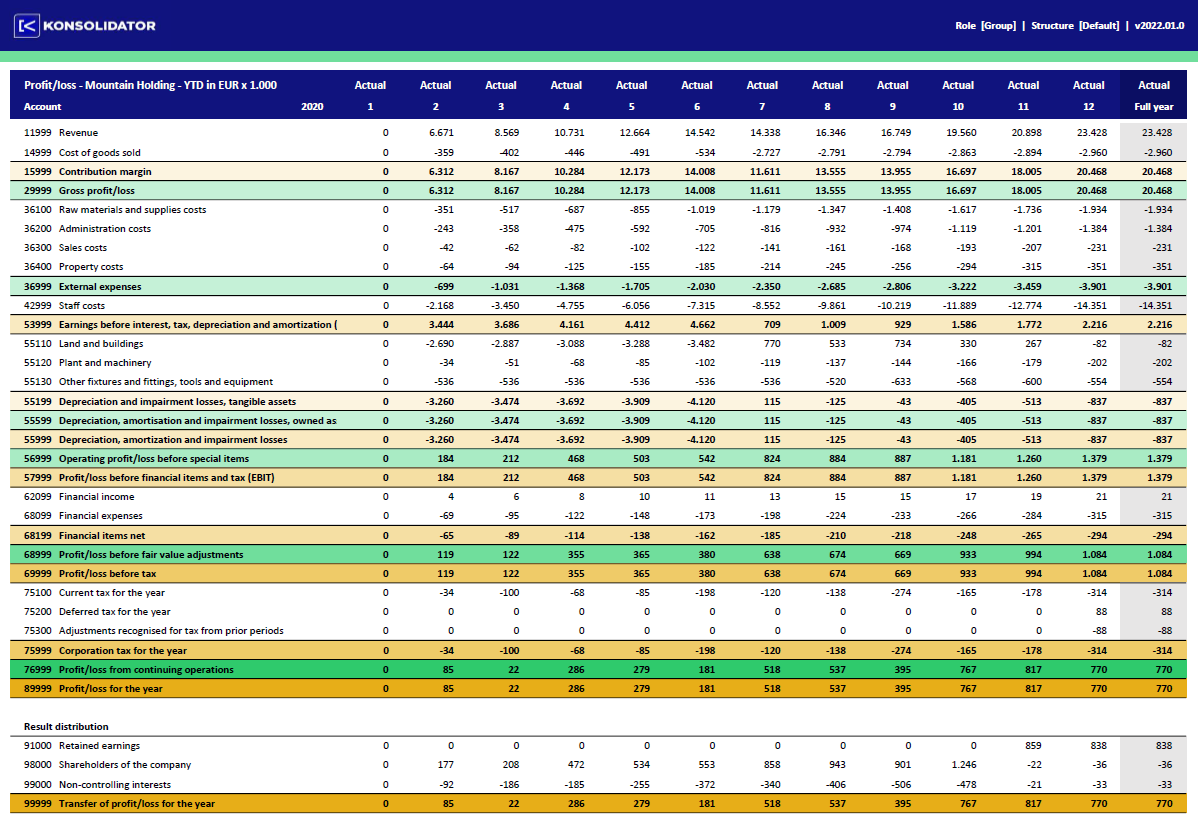
This report will display your consolidated numbers, for the company of your choice, in a year view based on the group account hierarchy as it is set up in Konsolidator. The report can also generate a forecast based on YTD actuals projected by using an existing budget/forecast.
Requirements
For this report to function properly you will have to have the latest version of Microsoft Excel installed. This means that your version of Excel must be Microsoft Excel 2021 or Microsoft Excel 365 (and up to date).
Getting started
To get started, you need to go to the "Data" Excel menu and press "Refresh all". Excel will then get the data according to your user credentials in Konsolidator Konnect. If you are not logged in you will be prompted to fill in your credentials
This report will also handle a financial year that doesn't not end with December. That information will be retrieved from Konsolidator on the first "Refresh All".
The file
Download the file here:
Presentation_report_AccountScheduleYear v2025.xlsx
Latest change:
- You only have the possibility to use a web API key. This means we have outphased credentials (username/password).
To update yours, follow our guide: How to update your Konnect API key - We have added 'All data' in Dimensions, making it possible to extract all dimensions from Konsolidator.
Version - 2025.09.23