
As a new feature, Konsolidator can show your group reporting in up to 3 alternative currencies if you have the Enterprise tier. This guide will go through:
- Setup
- Reports
- API changes
- Limitations
This feature is especially relevant for larger groups with different reporting currencies, for example, if your management reporting is in one currency but your statutory financial reporting is in another.
For management reporting only, not for statutory use.
Reporting Currency applies at the company level only and does not affect journals.
Therefore, it cannot be used for year-end reporting.
If you need year-end reporting in another currency, a new company must be created.
Contact cs@konsolidator.com to hear more.
Set up
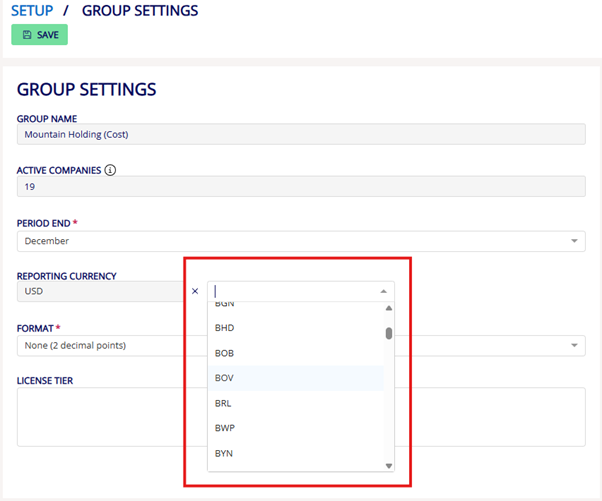
You can create up to 3 reporting currencies in your Group Settings.
BEFORE YOU START
To access the reporting currency feature, you must have an Enterprise subscription.
If you’re unsure which tier you are on or would like to upgrade, contact us at cs@konsolidator.com.
- Go to Setup → Group Settings
- In the “Reporting Currency” section, choose your alternative currencies from the dropdown list.
IMPORTANT:
Once you have completed your first consolidation using a Reporting Currency, that currency cannot be changed or removed
Reports
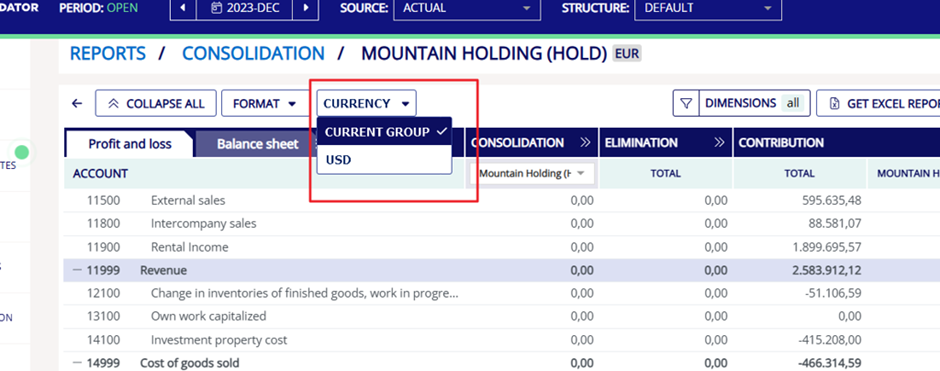
You can view your new currency filter(s) in the reports section for both Consolidation and Dimensions.
The alternative currencies will only be available for periods that have been consolidated after the new currency was added.
All existing filters, including “Export to Excel”, continue to work as usual.
All other filters work as usual, including ‘Export to Excel’.
API changes
The /reports/consolidated-accounts now have two extra properties:
- reportingAmountPeriod
- reportingAmountYTD
By default, these values reflect the first Reporting Currency created.
To request a different reporting currency, include an additional URL parameter:
?reportingcurrency=[CurrencyCode]
Only relevant for you if you have an existing API report.
These API changes are only relevant to you if you have an existing API report. If you need a full guide on how to change your API report, you can watch the step-by-step video here - INDSÆT LINK
Limitations
- Historic periods must be re-consolidated
Reporting currency amounts are available only after the first consolidation in which the currency is active. If you want reporting currency values for earlier periods, those periods must be re-consolidated.
Why? Konsolidator stamps values during consolidation to ensure consistent calculations. On-the-fly calculations would cause inconsistencies (e.g., February results changing after re-running January). - You cannot start using new reporting currencies mid–financial year.
If a new currency is added mid-year, only future periods will have correct reporting currency values, as we are doing separate per-month calculations for each reporting currency. - No selective or per-company reporting currency calculations
Konsolidator currently does not support:- Calculating only one reporting currency at a time
- Assigning different reporting currencies to individual companies