
This how-to guide is for you experiencing issues with the Microsoft Business Central integration installed after August 1, 2023.
We have ensured you can always reverse back to the old calculation method within the integration. This means it will not affect your integration use while we fix the issue.
Before you start:
You need to have access to Microsoft Business Central.
Follow these 2 simple steps:
Step 1: Go to "My Settings"
- Start by going to Microsoft Business Central.
- Click on settings in the top right corner.
- Choose "My Settings" in the drop-down.
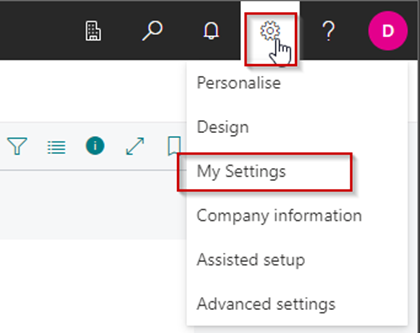
Step 2: Reverse to the old version
- In "My Settings" find "Notifications" and click on the text as shown below.
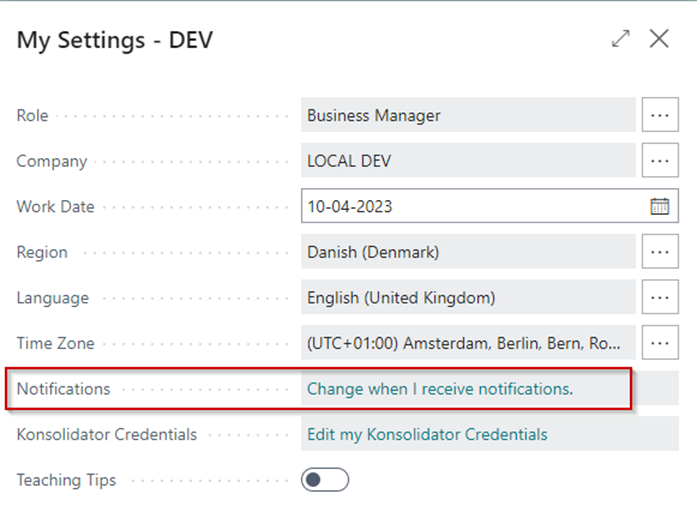
- On the page "Edit - My Notifications" remove the checkmark from the line "Konsolidator - Use performance optimized calculation method".
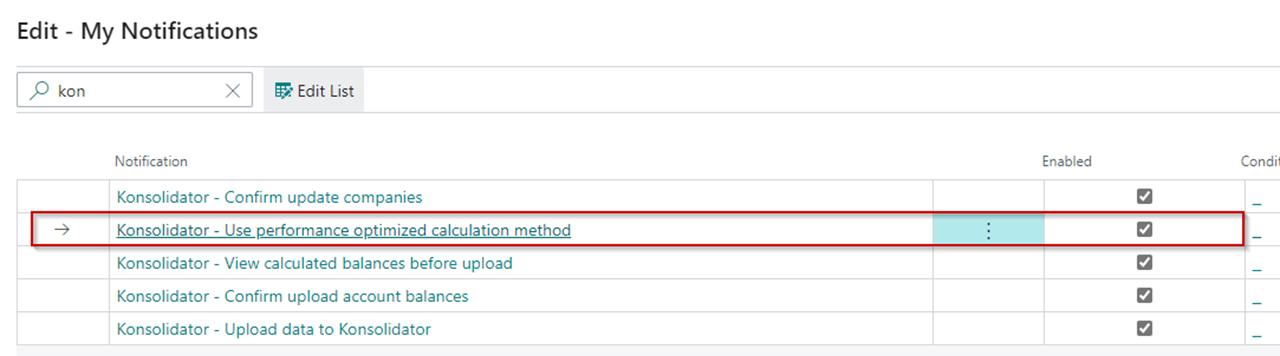
Now you have reversed the change and can run with the old calculation method within the new application until we have fixed the issue.
What made you reverse the change?
As we want to fix all potential issues within the new application, please send the specific bug you experienced to: support@konsolidator.com.