
What the connection error means
This error appears when Konsolidator cannot authenticate your connection to the Konsolidator Konnect API.
You will typically see a message like:
“We couldn't authenticate with the credentials provided. Please try again.”
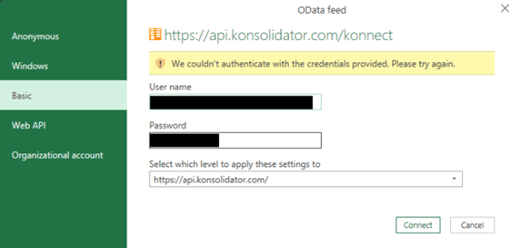
Or these error messages:
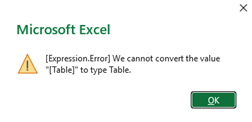
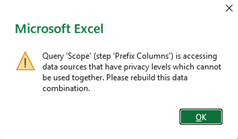
How to fix the connection error in Konnect
1. If you use an API key
If you are using an API key, you can reset your connection by following this guide:
➡How to update your Konnect API key (Excel) | Konsolidator
Remember to select “Clear All Permissions” in step 2.3 to reset your connection.
You are using the API key if you are using our Konnect Framework reporting file.
2. If you use a username and a password
If your file is set up with basic credentials, follow this guide to update your credentials in Excel:
➡Updating your Konnect credentials in Excel | Konsolidator
You will often use credentials if it is something you have built yourself, or an older version (before 2025).
Still not working?
If the problem continues, contact support with the following details:
- Your company name
- What you were trying to do
- A screenshot of the error message
Contact: support@konsolidator.com
Where you may see the connection error
You may experience this error when:
- Setting up a new Konnect connection
- Refreshing an existing connection
- Updating credentials (username or password)
Common causes
You connect to Konsolidator Konnect by using your login credentials or an API key.
The most common reasons for this error are:
- Incorrect username or password
- Incorrect Privacy Level (must be “Organizational”)
- Typing errors (for example, extra spaces)
- Expired or changed password
- Wrong authentication method selected (for example, “Basic” vs. “Web API”)
- Missing access rights for the user