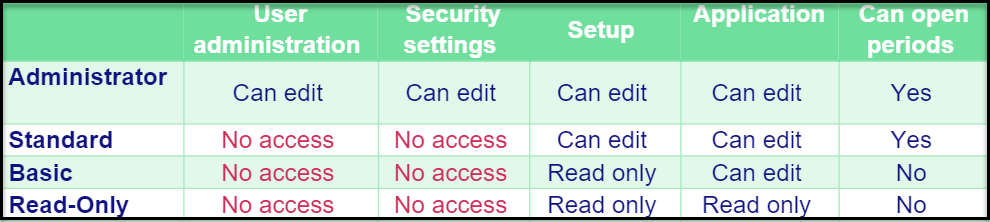
Managing and restricting users is fundamental in any system and, more importantly, when working with confidential financial information.
Under the menu User Administration, you can assign each user a given role to restrict their system usage. We work with the following four user roles:
- Administrator
- Standard
- Basic
- Read-Only
The Administrator regulates other users’ access to the system. Assign this role only to a limited number of trusted employees.
The Standard role is an employee who needs access to make changes to the setup such as creating new Group Accounts, mapping new accounts, and entering exchange rates.
The Basic role is a user who uploads numbers from one or more local entities. You can combine this role with Security Settings (Described in a separate memo) to further limit access to specific legal entities.
Read-Only is for anybody within the Group who does not need editing access but wants to see how far along the consolidation process is or other essential information within Konsolidator. It also applies to users who retrieve data via Konsolidator Konnect to Excel or Power BI.