
Please read the entire article before starting the implementation of IFRS 18 comparative figures.
The implementation of comparative figures by new environment is well suited for groups with multiple users with access to the consolidation tool and where the objective is to (re)apply the planned IFRS 18 mapping on the comparative figures.
For an initial introduction to the changes coming with IFRS 18, please refer to our article IFRS 18 in Konsolidator summarizing the changes from IAS 1 to IFRS 18 in brief as well as a side-by-side overview of our suggested implementation solutions.
When should you implement IFRS 18 by New Environment?
To give a brief overview of the implementation process by new environment and how the different reporting requirements are met, we have summarized in a table and explained in further details below.
Tabel 1: Reporting requirement
| Reporting for year: | 2026 (IAS 1) | 2026 (IFRS 18) | 2027 (IFRS 18) |
| Environment | Current (IAS 1) | IFRS 18 (copy of IAS 1 environment) | IFRS 18 |
| Purpose | IAS 1 reporting for 2026 including 2025 comparatives | IFRS 18 comparative figures for 2027 annual report | IFRS 18 reporting for 2027 |
| Reporting Standard | IAS 1 | IFRS 18 | IFRS 18 |
| Group CoA | IAS 1 | IFRS 18 | IFRS 18 |
| Mapping of local accounts | IAS 1 | IFRS 18 (re-apply mapping) | IFRS 18 |
| Uploads | Separate upload | Separate upload | Separate upload |
| Journals | Original journals | Original journals, adjusted for IFRS 18 as needed | Ordinary journals |
| Calculate & Post | NO* | YES | YES |
| Consolidation | Periods closed (unchanged) | Consolidate | Consolidate |
| Cash flow starting point | Differs | Operating profit/loss | Operating profit/loss |
| Subscription Tier | Enterprise Accounting | ||
* If the new environment is copied prior to finalization of 2026, the remaining periods, not covered, will of course require calculate & post prior to consolidation.
Utilizing the new environment allows you to prepare and work on the IFRS 18 changes alongside using the IAS 1 environment for IAS 1 consolidation purposes. This is especially relevant if multiple users have access and if IFRS 18 reporting must be prepared simultaneously without influencing IAS 1 reporting. The data in the new environment is copied at a certain date and thus uploads after date of copy must be made to both the IAS 1 and IFRS 18 environment. The same is relevant for manual journals.
Before you start
- Subscription Tier required: Enterprise Accounting Tier
- Process for copy: Ensure you have a copy of the current environment – reach out to your customer success manager for further discussions.
- Parallel consolidations: a copied environment cannot be linked to other environments, and as such, upload of data for the periods not copied must be performed twice
- API key: the API key used for Excel or PowerBI reporting is linked to the email used for accessing both environments. When updating your reporting data via API, ensure you are active in the correct environment, to extract the right data.
- Integrations: if you use ERP system integrations, these are not carried over as part of the environment copy and require re-integration. Follow our available guides in our Kommunity for How to set up your integration.
The copy of the current environment needs to be planned as the copy process involves lead time and timing is also to be considered to avoid double uploads.
Further, it is important that the group considers the intention of the new environment:
- is it only intended for testing with actual implementation in current environment or
- is it planned as the future environment after consolidating the comparative figures, leaving the historical environment as a legacy system
NB: Konsolidator will only guide you through the setup and preparation on how to adjust Konsolidator reporting going from IAS 1 to IFRS 18. The analysis of how to classify and report transactions according to IFRS 18 is to be assessed in a separate process by the group. The analysis will also support the groups in adjusting entries to be posted for IFRS 18 compliance.
The following steps 1-3 describes the steps required to prepare the comparative figures with the copied data from your IAS 1 environment in the income statement
Steps 4-6 describes the steps required to prepare the consolidated cash flow.
Steps 7-9 describes the process for running your consolidations after preparing the new IFRS 18 environment (step 1-6).
Step 1: Update your group accounts for IFRS 18
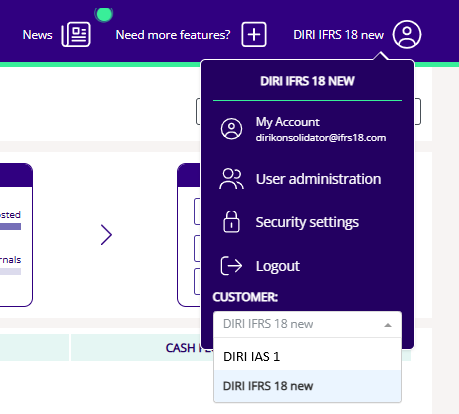
Once your new environment is prepared and access is granted, ensure you have switched to the new environment and only grant access to the relevant users in charge of preparing the comparative figures. You can read about creating users here and the user roles here.
Figure 1: How to switch between environments
Step 2: Disable IAS 1 group accounts
Once the group accounts have been updated for IFRS 18 the IAS 1 related group accounts should be disabled to avoid future mapping or adjustments made to these accounts.
Note the disabling of the IAS 1 group accounts will also hide these from your current IAS 1 mapping, when visiting your mapping via setup or preparing manual journals. The mapping of local accounts, including mapping on disabled group accounts, is accessible via the download.
Figure 2: Download mapping of local accounts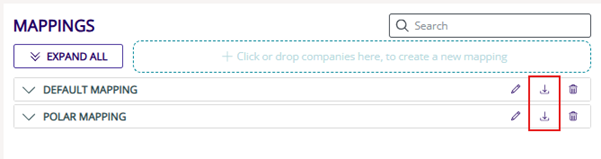
TIP: it is possible to disable multiple group accounts by disabling the related sum account though this requires attention to the logic of the group account structure.
Figure 3: Disabling multiple group accounts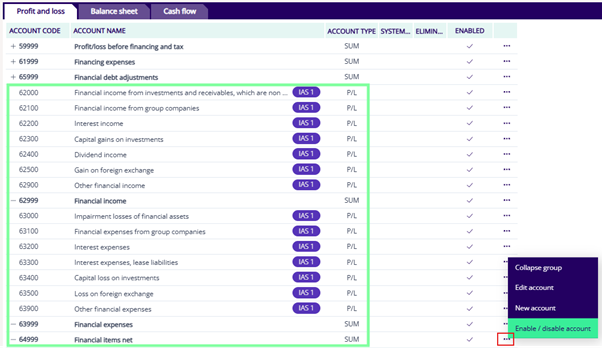
Step 3: New IFRS 18 mapping of local accounts
Once you have updated your group accounts for IFRS 18, you need to update your mapping of local accounts to present in accordance with IFRS 18. The template for mapping of local accounts based on the updated group accounts can be downloaded in excel by adding a new mapping and click download template.
Figure 4: Download mapping template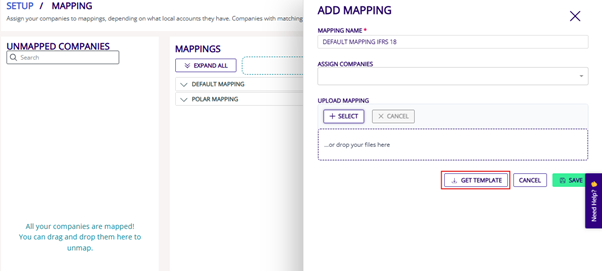
Once the mapping template is filled out, the template is uploaded under the “upload mapping” as seen in figure 4 above and the relevant companies are assigned via “assign companies” as per figure 4 above or via the drag and drop functionality.
If you wish to amend the current mapping, click directly on the relevant mapping to take you to the mapping view, where you can change your mapping by drag and drop functionality on group accounts or use “manage local accounts” for a view based on local accounts.
Once mapping is updated, the periods relevant for IFRS 18 comparative figures should be re-opened to proceed with consolidations for IFRS 18 compliance. To ensure the right exchange rate calculation, it is important to start with January and forward.
As the mapping was changed and the trial balances are already (uploaded) in Konsolidator, the mapping needs to be reapplied for each period before you proceed with the next steps of the consolidation process.
The following steps 4-6 and 8 are only relevant for groups using the cash flow feature in Konsolidator. Steps 7 and 9 are relevant for all groups.
Step 4: Create new cash flow group accounts
With the IFRS 18 classification of income and expenses in the income statement, the income statement presentation moves closer to the cash flow presentation, being split into operating, investing, and financing activities. Further, as a consequence of the new IFRS 18 standard, IAS 7 Statement of Cash Flows has been amended. The amendment requires entities to use the operating profit subtotal as the starting point for the cash flow from operating activities under the indirect method.
As a result, in Konsolidator, you need to add new cash flow accounts for the cash flow presentation and map all new IFRS 18 group accounts created as part of step 1 above. Read more about how to add new cash flow accounts here. For the changes in the cash flow account mapping, refer to next steps in this article.
Konsolidator recommendation: To retain a logic presentation of the cash flow statement, and present both financial income received and financial expenses paid as first line item in the cash flow from investing activities and cash flow from financing activities respectively, a renumbering of Proceeds and purchase of intangible assets and Proceeds and purchase of property, plant and equipment is required. Note the numbering of the cash flow accounts below is only the recommendation of Konsolidator and not mandatory.
Table 2: Renumbering cash flow accounts
| New cash flow account | Old cash flow account | Cash flow group account name |
| 3110 | 3010 | Proceeds from sale of intangible assets |
| 3120 | 3020 | Purchase of intangible assets |
| 3199 | 3099 | Proceeds and purchase of intangible assets, net |
| 3210 | 3110 | Proceeds from sale of property, plant and equipment |
| 3220 | 3120 | Purchase of property, plant and equipment |
| 3299 | 3199 | Proceeds and purchase of property, plant and equipment, net |
The following new cash flow accounts should be added:
Table 3: New cash flow accounts
| Cash flow group account | Cash flow group account name | Sum account |
| 3010 | Financial income received | 3099 |
| 3020 | Financial income received – intercompany | 3099 |
| 3099 | Financial income received | 3999 |
| 4010 | Financial expenses paid | 4099 |
| 4020 | Financial expenses paid – intercompany | 4099 |
| 4099 | Financial expenses paid | 4999 |
Step 5: Map P&L group accounts to cash flow
To calculate and consolidate the cash flow, all income statement and balance sheet accounts require mapping to the relevant cash flow accounts. You can read more about cash flow account mapping here.
Based on the standard set of group accounts and the changes added as per our guide How to change Group Accounts in Konsolidator, we recommend the following mapping to the cash flow accounts:
Table 5: Mapping of new P&L group accounts to cash flow accounts
| Group account | Group account name | Cash flow account | Cash flow account name |
| 11900 | Gain/loss on foreign exchange rates for receivables | 1000 | Revenue |
| 14850 | Intercompany adjustments | 1010 | Cost |
| 14900 | Gain/loss on foreign exchange rates for payables | 1010 | Cost |
| Operating profit/loss | |||
| 58300 | Financial income from investments and receivables, which are non current assets | 3010 | Financial income received |
| 58310 | Financial income from Intercompany receivables | 3020 | Financial income received - intercompany |
| 58320 | Interest income | 3010 | Financial income received |
| 58330 | Dividend income | 3010 | Financial income received |
| 58380 | Foreign exchange difference on cash and short-term deposits | 3010 | Financial income received |
| 58390 | Other investing income | 3010 | Financial income received |
| 58400 | Gain from fair value adjustment of investment properties | 3430 | Improvements of investment properties |
| 58410 | Profit on sale of investment properties | 3410 | Proceeds from sale of investment properties |
| 58420 | Capital gains on investments | 3410 | Proceeds from sale of investment properties |
| 58430 | Impairment loss of other financial assets | 3720 | Acquisition of other financial investments |
| 58500 | Impairment loss of investment properties | 3420 | Purchase of investment properties |
| 58510 | Loss on sale of investment properties | 3410 | Proceeds from sale of investment properties |
| 58520 | Capital loss on investments | 3410 | Proceeds from sale of investment properties |
| Changes in investing income | |||
| 61000 | Interest expenses, intercompany liabilities | 4020 | Financial expenses paid – intercompany |
| 61100 | Interest expenses | 4010 | Financial expenses paid |
| 61200 | Interest expenses, lease liabilities | 4210 | Interest paid on lease liabilities |
| 61800 | Foreign exchange differences on interest-bearing loans and borrowings | 4120 | Repayment of borrowings |
| 61900 | Other financial expenses | 4010 | Financial expenses paid |
| 65000 | Fair value adjustment of mortgage debt | 4120 | Interest paid on lease liabilities |
| 65100 | Profit/loss on financial debts | 4120 | Interest paid on lease liabilities |
| Changes in financing income |
Step 6: Change cash flow account mapping of existing group accounts
The main purpose of the new IFRS 18 accounts created as per step 1, is to smoothen the transition and audit trail from upload to consolidated cash flow. However, system accounts are not duplicated in this process, hence require an update of the cash flow account mapping.
After updating the mapping, it will not be possible to trace the cash flow mapping details (as shown in Figure 2 above) in historical periods .
Below we have summarized the relevant system accounts with their current cash flow account mapping and the updated cash flow account mapping.
Table 6: Remapping of cash flow accounts
| Group account | Group account name | Cash flow account | New cash flow account |
| 58110 | Share of profit/loss from subsidiaries | 1040 | 3510 |
| 58120 | Amortization of goodwill | 1040 | 3510 |
| 58130 | Change in internal profits on inventories | 1040 | 3510 |
| 58140 | Dividend income | 1040 | 3530 |
| Income from investments in subsidiaries | |||
| 58210 | Share of profit/loss from associated companies | 1040 | 3610 |
| 58220 | Amortization of goodwill | 1040 | 3610 |
| 58230 | Dividend income | 1040 | 3630 |
| Income from investments in associates | |||
| 140310 | Depreciation at the beginning of the year | 1440 | 3430 |
| 140320 | Transfers from/(to) other items | 1440 | 3430 |
| 140330 | Exchange rate adjustments | 1440 | 3430 |
| 140340 | Depreciation for the year | 1440 | 3430 |
| 140350 | Depreciation reversed on disposals during the year | 1440 | 3430 |
| 140510 | Revaluations at the beginning of the year | 1440 | 3430 |
| 140520 | Transfers from/(to) other items | 1440 | 3430 |
| 140530 | Exchange rate adjustments | 1440 | 3430 |
| 140540 | Revaluations for the year | 1440 | 3430 |
| 140550 | Reversed revaluations | 1440 | 3430 |
| 140560 | Disposals during the year | 1440 | 3430 |
| Investment properties (balance sheet accounts) |
Validation point: no (active) group accounts are mapped to cash flow accounts from 1039 Operating profit/loss to 1099 Profit/loss for the year. Old IAS 1 group accounts can be ignored. These are redundant and no longer considered active.
Figure 6: Validation check of cash flow accounts mapping (no mapping after 1039-1099)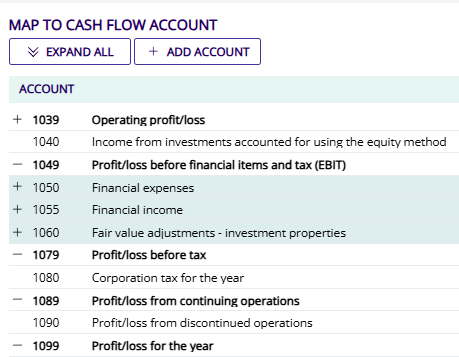
Step 6a: For entities preparing cash flow starting at profit after tax – additional change of mapping
For those entities currently presenting their cash flow starting at profit after tax, additional change of existing mapping is required as no new IFRS 18 group accounts were created for corporation taxes.
In our standard set of group accounts the following group accounts require cash flow account remapping. If additional group accounts are mapped against cash flow account 1080, these will require remapping as well.
Table 7: Remapping of corporation tax group accounts from cash flow account 1080
| Group account | Group account name | Cash flow account | New cash flow account |
| 75100 | Current tax for the year | 1080 | 2300 |
| 75200 | Deferred tax for the year | 1080 | 2300 |
| 75300 | Adjustments recognised for tax from prior periods | 1080 | 2300 |
| 75400 | Group contributions received | 1080 | 2300 |
| 75500 | Group contributions paid | 1080 | 2300 |
| Corporation tax |
The following steps will walk through the considerations for running your consolidation of income statement, balance sheet and cash flow.
Step 7: Adjust relevant journals and run consolidation of income statement and balance sheet
If you haven’t yet reapplied mapping for the relevant period, please refer to step 3 above and ensure to do so before proceeding with the next steps of the consolidation process.
With the mapping reapplied it is time to adjust the uploaded balances as needed. If you have manual adjusting journals, reclassification journals or elimination journals in your IAS 1 environment, consider if these are relevant for your IFRS 18 consolidation as well.
As there is no linkage between environments, it is not possible to utilize the copy journals functionality in Konsolidator. It is, however, possible to download journals to Excel from the IAS environment and upload directly to the IFRS 18 environment, implied that the downloaded journal format matches the journal template. Journals can be downloaded one-by-one via the Export to Excel” functionality or extract in bulk via Konnect Framework.
In case line items in the journals from the IAS 1 environment are related to IAS 1 tagged accounts, these journals require an update to the right group account. This can potentially be adjusted in Excel prior to uploading it to Konsolidator.
Further it is important to pay attention to any IFRS 18 adjustments required, such as e.g. exchange rate adjustments; exchange rate adjustments are, in accordance with IFRS 18, required split and presented with the transactions that gave rise to the exchange rate difference. If the exchange rate differences are not split at local account level and mapped for the comparative figures, a reclassification journal should be used.
Once all adjustments are completed, calculate & post and run the consolidation.
Step 8: Adjust relevant CFA/CFE journals and run cash flow calculation
In case Cash Flow Adjustments (CFA) from the IAS 1 environment are related to specific IAS 1 accounts, these journals require an update to the right IFRS 18 group account. This can potentially be adjusted in Excel prior to uploading it in Konsolidator (as also mentioned in step 7 above). This will only apply to group accounts in the income statement.
Similarly, any cash flow eliminations (CFE) adjusting the profit/loss for the year, should be considered if relevant for the IAS 1 amended cash flow presentation and if so, accordingly adjusted.
Step 9: Consolidation of periods post-environment-copy
For the periods not copied to the new environment, it is necessary to upload in both the current and new environment.
Adjusting journal entries (AJE) or reclassification journal entries (RJE) shall be copied and added to the new environment as needed.